



I gave Claude a description of who I sell to. 15 minutes later I had 25 real people who fit that description with their job titles, companies, locations and bios, and for a couple of them I decided to create a personalization outreach message to send on LinkedIn.
The search cost me $0.10. The posts cost $0.015. A total of $0.115.
I didn’t babysit it through 6 steps. It was just an independent worker that had a task to do and completed it.
Ok look, you need 2 things to build this: Claude and a free Apify account. No terminal, no code.
Subscribe and you’ll get 5 Claude SKILLs that save you 15 hours every week for FREE.
So let’s hire our Sales Rep
Your first employee does 5 things, in order:
Takes your ICP, in plain English
Turns it into a LinkedIn search
Finds the people whose profiles match those filters
Reads what they have been posting about
Writes a first message to each, based on what it found
At the end you have a CSV. One row per person, with the message already written. You read them, you delete the ones you do not like, you send the rest.
1. ICP
ICP means Ideal Customer Profile. It is a description of who actually buys from you.
Not who could buy from you. Who actually does, or who you have decided to go after next. Most people write this as a paragraph of vibes: “small businesses who want to grow”. That version is useless, because you cannot search for it.
The useful version is 5 answers:
What is their job title? The words on their LinkedIn, not the words you would use.
How senior are they? The owner, a director, a manager?
What industry?
How big is the company? 1-10 people behaves nothing like 200 people.
Where are they?
Say you sell to coaches. Your whole ICP is this short:
1. Job title: business coach, executive coach
2. Seniority: owner or C-level
3. Industry: coaching
4. Company size: 1 to 50 people
5. Location: United States
That is all you write. Five lines, in your own words.
Write yours down before you touch anything else. That is your ICP, and it is your search filter.
Step 1: Get an Apify account
Apify is a marketplace of small cloud programs called Actors. Each one scrapes a specific thing. You give it a search or a URL, it gives you back structured data. No code involved, you fill in a form and press start.
Sign up at apify.com. The free plan is $0 a month with $5 of platform credit and no card required.
Once you are in, go to Settings, then API and integrations, and copy your API token. Keep it somewhere. Never paste it into a public page.
While you are in Settings, look at Limits. There is a maximum monthly usage figure that sits separately from your credit. If it is set to zero, every run you start will be rejected with “Monthly usage hard limit exceeded” while your $5 sits there untouched, and nothing in the error tells you where to look. I lost half an hour to that stupid error.
We are using 2 Actors:
neuralverge/neuralverge-linkedin-people-search to find people. $0.10 per block of 25 results.
apimaestro/linkedin-profile-posts to read what they have been posting. $0.005 per post.
So 25 leads costs 10 cents. Reading 3 posts for one of them costs another 1.5 cents.
One warning that will save you money. The posts Actor has a limit field that defaults to 100. Leave it alone and a prolific poster bills you 100 posts, 50 cents, for a single lead. That is five times what the entire search cost. Always set total_posts. The skill below does it for you.
Step 2: What your 5 lines turn into
You can ignore this part, because the skill does it for you, but it is worth seeing once.
Those 5 plain lines about coaches become this:
{
  "currentJobTitleFilter": ["Business Coach", "Executive Coach"],
  "seniorityLevelFilter": ["Owner", "CXO"],
  "companyHeadcountFilter": ["1-10", "11-50"],
  "locations": ["United States"],
  "scraperMode": "short",
  "maxResults": 25
}
That is nearly the same words you wrote. The filters take plain English, so there are no industry codes to look up and nothing to get subtly wrong.
Three things worth knowing before you spend anything.
Always ask for 25. Billing is per block of 25, and a search costs a full block even if it matches nobody. Asking for 5 costs exactly the same as asking for 25. I know because my first test asked for 5 and got charged $0.10005 for it.
25 is the ceiling on the free plan, and there is no page 2. The Actor has no pagination parameter at all. Getting to 100 people means you run 4 different searches with different filters, by state or by title variant, and removing duplicates. Each one costs its own block. Anyone telling you to just raise the number has not tried it.
Use short, not full. Full mode costs $0.225 per 25 instead of $0.10, and short mode already returns the title, company, location, tenure and the person’s entire About section. There is nothing to upgrade for.
One thing to be clear about: this is just filtering, not matching. LinkedIn returns whoever sits in those buckets. Nothing scores whether a person genuinely fits you. In my run, roughly 14 of the 25 were real coaches. The rest were generic CEOs, a nonprofit director, an insurance association head and a tutoring franchisee.
So, here’s what you can do in order to increase the accuracy of your leads. You could buy LinkedIn Premium, create a list with LinkedIn Sales Navigator, and scrape that list with Apify. Yes, it costs 120 bucks per month, but it’s worth it if you’re serious about getting in more people into your funnel.
Step 3: Paste in the employee
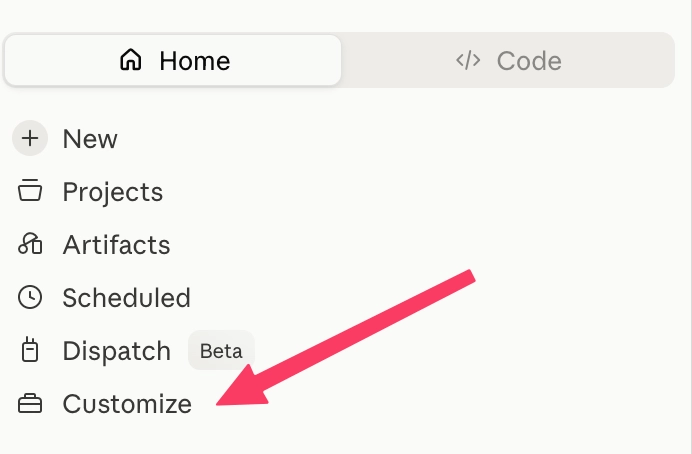
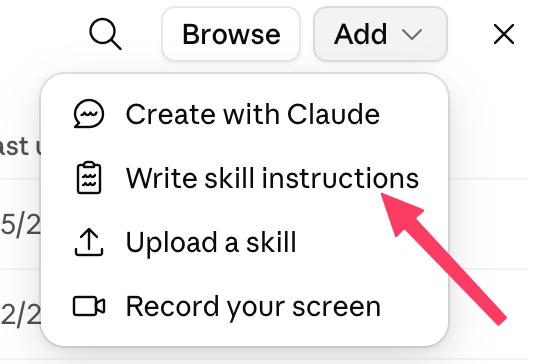
Go to your SKILLs tab by following this guide here:

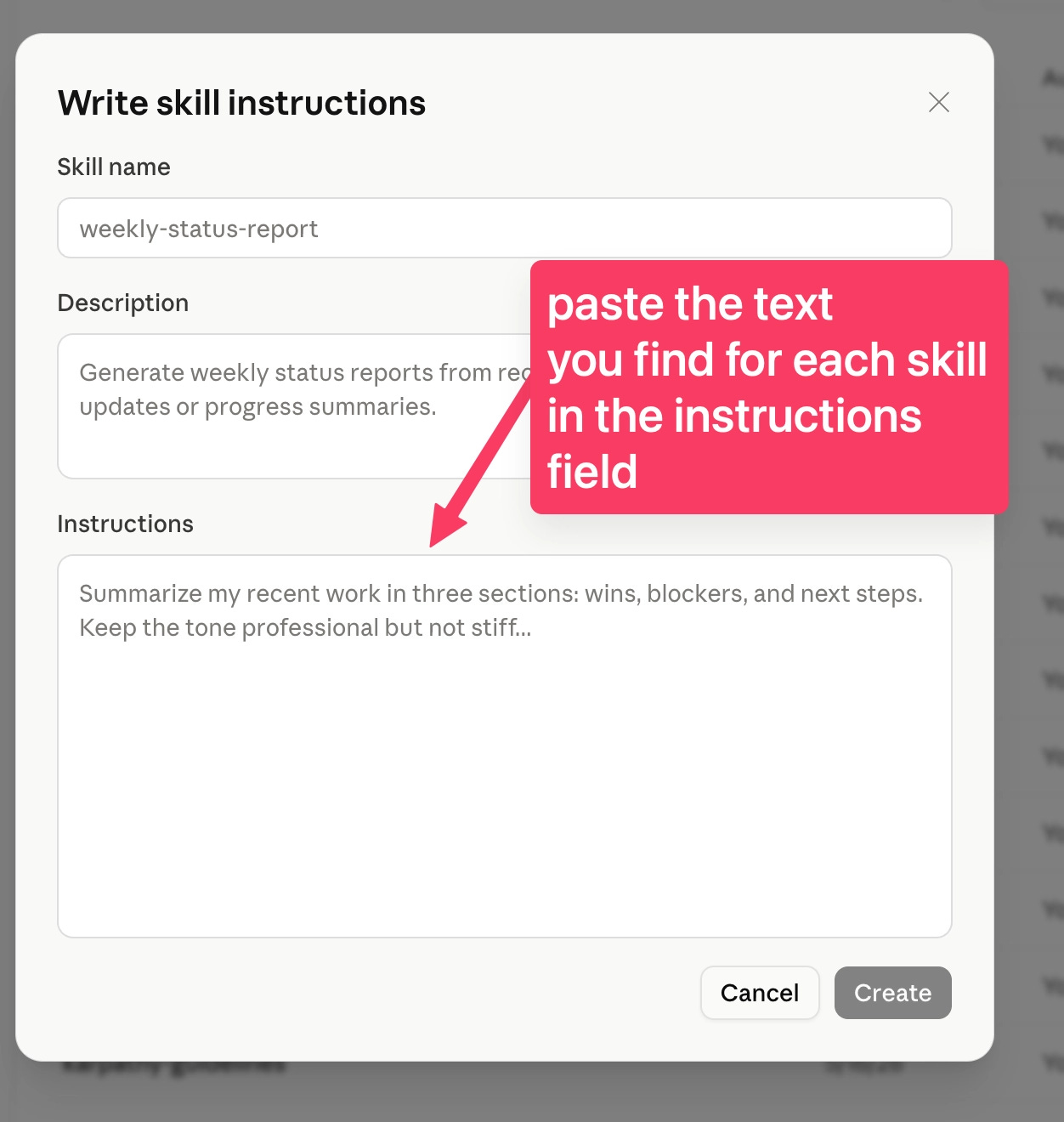
Skill name
lead-finder
Description
Runs the full outbound lead pipeline: takes the user's ICP in plain English, turns it into LinkedIn search filters, finds matching people, reads their recent posts, and writes a personalised first message for each one, delivered as a CSV. Use when the user says "find me leads", "get me some leads", "I need prospects", "who should I reach out to", "build me a lead list", "run outreach for", or asks for people to contact for their business.
Do not skim past that description, it is the part that decides whether any of this ever happens.
A skill has 2 pieces that everyone treats as one thing, while they do completely different jobs. The description sits in every conversation you have, permanently, at around 100 tokens. The instructions are not loaded at all until that description matches what you just asked for. So a vague description means the instructions never get read. Not once.
I learned this the boring way. I have a skill that does my Sunday content review, and the first version worked fine except I had to ask for it by name every week, which is just a prompt with extra steps. Then I rewrote the description to list the exact words I actually type on a Sunday, “review my posts”, “what worked this week”. It started firing on its own.
That is why the description above ends with 6 real phrasings. Add your own.
Instructions
You are the user's lead generation employee. You run 5 stages in order
and you do not skip any of them.

## Stage 1: Get the ICP in plain English

Ask for their ICP if you do not already have it. You need 5 things:

1. Who they sell to, in normal words
2. How senior those people are
3. What industry
4. How big the company is
5. Where they are

Ask for all 5 in one message, in plain language. Never ask for a code,
an ID or a filter name.

If they do not have an ICP, do not send them away to write one. Ask them
who their last 3 customers were and what those people had in common.

## Stage 2: Turn the ICP into the search

Build the input for neuralverge/neuralverge-linkedin-people-search.

  currentJobTitleFilter: their titles, expanded to 3-5 real variants
  seniorityLevelFilter: "Owner", "CXO", "Director", "VP", "Manager"
  companyHeadcountFilter: "1-10", "11-50", "51-200", "201-500"
  locations: full country or city name, never an abbreviation
  scraperMode: "short"
  maxResults: 25

Expand the titles. "Coaches" becomes Business Coach, Executive Coach,
Leadership Coach, Performance Coach. One title finds a fraction of the
market and the leads you miss are invisible.

ALWAYS set maxResults to 25. Billing is one block of 25 whether you ask
for 1 or 25, so asking for fewer is throwing away records the user has
already paid for.

Use scraperMode "short". Full mode costs more than twice as much and
short already returns title, company, location, tenure and the person's
full About text.

There is no pagination. If the user wants more than 25, tell them the
truth: it needs several searches with genuinely different filters, one
block charge each, then deduplication on the id field. Do not pretend
one run can do it.

Show them the finished JSON plus one sentence of plain English
describing who it will find. Ask them to check the sentence, not the
fields. Get a yes before spending, and say the cost first: $0.10.

## Stage 3: Find the people

Run the actor. If you have an Apify tool available, run it directly. If
not, give them the JSON to paste into the Actor's input on apify.com,
and ask them to export the results and paste them back.

Then filter on title text before spending another cent. Roughly half of
what comes back will not match the ICP no matter how good the filters
were. Drop those now. Every one you keep costs money in the next stage.

Tell the user how many of the 25 survived and why the others went.

## Stage 4: Read what they post

For each surviving lead, run apimaestro/linkedin-profile-posts with:

  username: the lead's linkedinUrl, exactly as it came back
  total_posts: 3
  limit: 3

Pass linkedinUrl through unchanged. It looks wrong, an opaque string
like linkedin.com/in/ACwAAA..., but the posts actor resolves it.

ALWAYS set total_posts and limit. The limit field defaults to 100, and
one prolific poster would bill 100 posts at $0.005 for a single lead.

An empty result is ambiguous: it means either the person does not post
or the id did not resolve. Do not guess which. Mark the lead
POSTS-EMPTY, say so, and carry on from their About text.

Read the posts, then read the About text from Stage 3 again. You are
looking for one thing, and it is not a quotable line. It is what this
person is short of. Who they sell to, what they are trying to grow,
which part of the job they are obviously still doing by hand.

Write it down as a plain phrase: "more meetings with insurers", "less
time spent writing proposals". That is the need, and it is the only
research that reaches the message.

The About text is usually the better source. Posts give you tone, and
plenty of founders only post holidays and book lists. An empty posts
result is not a reason to skip, it is a reason to lean on the profile.

No plausible need means SKIP. A row with no message is honest. A
fake-personal one costs the user their reputation.

## Stage 5: Write the messages

One message per surviving lead.

Every outreach message on LinkedIn is built the same way: open by
quoting something they posted, add a clever observation, close with a
question about their content. They have read that message a thousand
times and they can smell it in the first line. Being better at the
standard template is not an advantage. Not using it is.

So do not open with the hook. Open by saying who you are.

The message has 4 beats, in this order, and nothing else.

1) A plain greeting that admits exactly what happened.
   "Hey {first name}, just peaked at your profile."
   No compliment, no "I came across", no invented reason for being
   there.

2) Who you are, in one blunt line, in the words you would use at a bar.
   "Look, I build automations for a living."
   A job, not a value proposition.

3) Your intent, stated before they have to work it out.
   "I was genuinely thinking how I might help here."
   This is the interrupt. Nobody says it, because everyone is
   pretending the message is not outreach. Saying it plainly is what
   makes the rest readable.

4) The one thing they are short of, offered as an open door.
   "and if you might be interested in {the thing}"
   This is where the research goes: not as a quote of their post, as
   your read of what they want more of. Then stop writing. No calendar
   link, no "worth a chat?", no next step.

Rules:

- Under 400 characters.
- Never quote or paraphrase their post back to them. Stage 4 research
  informs beat 4 only, and it should be invisible.
- Never ask a question about their content.
- Never compliment them.
- Banned outright: "I came across your profile", "I hope this finds you
  well", "I loved your post", "quick question", "worth a chat",
  "let's connect", "circle back", "I'd love to".
- Write it slightly imperfect. Contractions, a comma splice, a word
  that is not quite the formal one. Clean copy reads as automated,
  because it is.
- Do not pitch, do not name a price, do not explain your process. The
  goal of message 1 is a reply, not a sale.

Write in the user's voice if you know it. If not, ask them to paste 2
messages they have actually sent, and match those.

## Output

A CSV with exactly these columns:

  name, headline, company, profile_url, their_need, message, status

status is SEND or SKIP. Sort SEND rows first.

Then tell them 4 things: how many came back, how many survived the ICP
filter, how many got a plausible need, and the exact amount spent.
While you are in that panel: Snyk, a security company that scans code and dependencies for vulnerabilities, ran a pass over public Claude skills and found prompt injection techniques in 36% of the ones they tested. A skill can run code and use your tools. Read anything you install, including the one above.
Step 4: Run it
New conversation. Do not name the skill. Type the way you would ask a person:
find me some leads for this weekIt should come back asking who you sell to, in plain English.
What to check: if it gives you generic advice about lead generation instead of asking who you sell to, the skill did not fire. You are probably in an old conversation. Start a new one. If it still does not fire, add the exact words you typed to the description.
Step 5: What actually came out
Here is a real row from my run, not an illustration.
The search returned 25 coaches for $0.10005. One of them was John Whitt, a business coach in Vancouver, Washington, 15 years at his own firm. Three of his posts came back for $0.015.
This is the one the hook came from:
Most businesses don’t fail because they had a bad idea. They fail because they run out of runway before a good idea has time to work.
The concept is rarely the problem. The problem is carrying a debt load you can’t sustain long enough to see the idea become real and profitable.
And the message written off it:
Hey John, just peaked at your profile. Look, I build automations for a living. I was genuinely thinking how I might help here. You’re 15 years into running your own firm, so I’d guess most of the repeat work still lands on you. And if you might be interested in getting some of that off your plate, I’m around.
You of course can adapt the voice in your skill how you like it, this is not a marketing copy template of course, just showing what the system can do.
Notice what that message does not do. It does not quote his post back at him, and it does not open with a clever line about runway. Every message in his inbox does that. He has learned to stop reading at the first one.
What the post actually did was tell me what he is short of, which is time he is not selling. That went into the last line and nowhere else.
The research is still in there. It is just invisible, which is the only place research belongs.
Total for the run: $0.11505.
Open the CSV in Sheets. Read the messages, delete the ones that feel off, and there will be some. Copy the rest, open LinkedIn, send them by hand.
That last part is not a limitation I forgot to solve.
What you actually built
An employee that takes 5 lines of plain English, works out the search on its own, finds 25 people, reads what they have been saying, and hands you messages that are all true.
It has a job title. You do not tell it how to do the job, you tell it who to go after. And you never say its name.
What it does not do
The gap between this and a real outbound system is the part everyone skips, so here it is.
It does not send. You copy and paste. Automated sending from your own LinkedIn account is how accounts get restricted, and the difference between a system that runs for a year and one that locks you out in a week is not the messages, it is the sending pattern, the volumes, the timing and the warm-up.
It does not get past 25 in one go. No pagination, and the free plan caps a run at 25. More means several searches with different filters and a deduplication step.
It does not remember. Run it twice on a similar ICP and it hands you the same people again.
It does not score. About 11 of my 25 were not really coaches. Knowing which ones are worth a message before you spend the message is the single biggest lever in the whole thing.
It does not handle replies. When somebody answers, you are on your own.
One honest note on the rules
You are collecting data about real people. Two things follow.
LinkedIn’s user agreement does not permit automated scraping of the platform, and these Actors work on publicly visible data without your account. That is a real distinction, and it is also not a legal opinion, so use your own judgement about your own risk.
If any of your leads are in the EU or the UK, GDPR applies to what you collect and what you do with it. In practice that means a lawful basis for contacting them, and honouring it immediately when somebody asks you to stop. This is not a reason to skip outbound. It is a reason to keep the list small and the targeting tight, which is what makes outbound work anyway.
The people who get burned are the ones who scrape 50,000 contacts and blast them. That was never the plan. The plan is 25 people you can say something true to.
Then hire the next one
The pattern does not change. Pick a job somebody in your business does by hand every week. Write down the sentence you say when you want it done. Give it a description that fires on those words. Give it the stages.
That is the whole thing. The skill format is nothing special, it is a folder with a text file in it. What makes it an employee is that you stopped having to ask.
If you would rather start from something that already runs, subscribe to the newsletter and I will send you 5 free Claude skills that save you 15 hours a week.
Subscribe and you’ll get 5 Claude SKILLs that save you 15 hours every week for FREE.
Talk soon,
Ilya
Nice system, I especially like the 4-beat message structure, but is it correct to treat as a "lead" people who just are on LinkedIn and tou are aware of? For me, lead is someone who expressed interest but not bought abything yet - sth like signing into a free trial or giveaway