



Intro
Look, I’m the last person on the internet that will give you bs about how amazing AI agents are. Probably by now everyone knows what an AI agent is and how much work they can do for you and how much leverage they can give you.
In today’s article I will explain to you what having a swarm of agents really means. I’ll walk you through my team of agents, how they operate, what they do exactly and why you should have one too especially if you’re running a small to medium sized business.
So stick along.
Subscribe to No BS AI. One real copy-pasteable build like this every week.
What my work looks like on paper
So to make sure you understand what I do on a day-to-day. I build automations for clients and I write this newsletter on top of that, so my week is a mix of 7 kinds of work: outreach, content, inbox and calendar, client documents, automation, code and keeping track of the numbers. I wrote down every separate job inside them, one by one, and it came out at 30.
On a normal team each of those jobs is a different person with a different skill. So you either hire 30 people and somehow you’re able to manage all of them or half of the tasks don’t get done.
My 7 agents, and what they report back
So what’s my setup and who does all of this? Well, I have seven different agents.
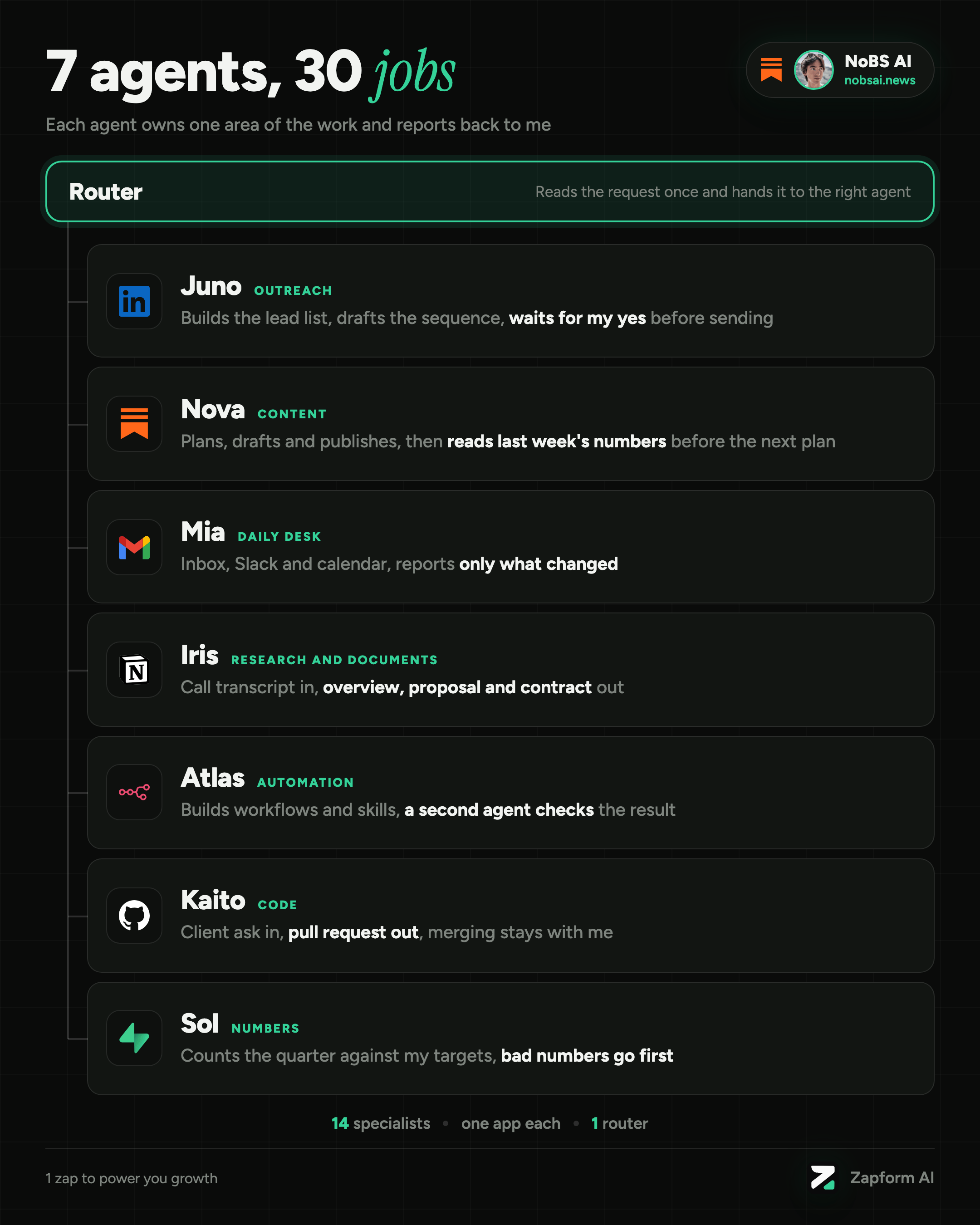
Each one has a name and one area of the list:
Juno does my outreach (8 jobs). It builds the lead list, drafts the sequence, and waits for my yes before anything gets sent, tracks my campaign replies and does a bit of reporting.
Nova handles my content (7 jobs). Plans the week, drafts the article scaffold with a structure that might fit the article, checks my post performance, makes the visuals, then reads last week’s numbers before planning the next one.
Mia is the receptionist (4 jobs). It reads the inbox, checks Slack and runs my entire calendar.
Iris does all the research and client documentation (4 jobs). Turns a call transcript into the overview, the proposal and the contract, all of them end up sitting in my Notion.
Atlas is the automation guy (3 jobs). It builds workflows and Claude skills against a goal that’s written down first, and a second agent checks the result. I use it to mainly spot what really needs automation.
Kaito is my personal coding assistant (3 jobs). It takes what a client asked for in Slack, makes the change and pushes to production. My job here is mostly reviewing.
Sol is the numbers guy (1 job). It counts what actually happened this quarter and compares it to the targets I set in advance. It’s also a good way of keeping me accountable.
Now I have 7 AI agents in total and the rule behind all 7 is the same: one job, written as a loop, with one stop where it might ask me for my opinion.
Behind those 7 sit 14 specialists that each talk to one app and nothing else (Notion, Gmail, GitHub and so on), plus 1 router that only reads the message and picks who gets the work.
Every one of them ends with a report and a decision that stays mine. For example Juno waits for my yes before sending any message. I decided to build it like this because a wrong message to a stranger should need my yes first.
How to set up an agent like this
Ok. Enough about my setup, here is how you build an AI agent that does one specific job for you.
I’ll use the outreach agent as the example, because its loop is the easiest one to see and probably it’s the most valuable for you guys.
The other six follow the same rule with a different job.
3 steps, about 35 minutes of work, and you only do it once. The first messages go out as people accept your requests, so expect a few days of waiting in the middle.
Step 1: write the job as a loop (10 minutes)
An agent can only follow a job that’s written in order. So before you open anything, I suggest you write down what you do today when you reach out to a new customer or lead, one line per step.
Mine goes like this: list, qualify, draft, ask, send, review.
That’s the loop Juno follows, and the ask is the stop, where it shows me everything that it drafted so far and waits for my yes.
You also need a pace. For example LinkedIn allows roughly 100 connection requests per week, so that number decides how many people your agent should contact, and I believe a slow start costs less than a restricted account. X and Threads might require different pacing.
I’m talking from experience here, you can easily get restricted, especially on LinkedIn, if you fail to follow their policies, so just be careful on the amount of pages you visit and the amount of messages you send.
Step 2: send your first 10 connection requests (10 minutes, then wait)
Now I assume you already have a list and if you don’t know anything about lead lists, ICPs, I strongly suggest you read these 2 articles I published:
Building your ICP: How to sell an offer to the right people in 67 minutes
Finding people to contact: Get 500 Leads for $0 in 25 minutes
So you should already have a list of qualified people to contact.
Send a connection request to the first 10 of them, without a note, because a note makes the request read like a pitch. The first message can only go to people who accepted, so this step fills the list for the next one.
Step 3: set up the agent once and run it (15 minutes, once the first ones accept)
This is the prompt behind my outreach agent. You set it up once: create a new chat in Claude Code, paste this as the project instructions, and connect a browser so it can work inside your own logged-in LinkedIn (I run it in the browser pane). After that you never paste it again, you open the project and send it your list of people who accepted:
## Context
You are my LinkedIn outreach agent. You work inside my own logged-in LinkedIn session in the browser, at human pace. The goal of the first message is a reply. If someone answers with three words, it worked. It is not a meeting and not a sale.

## Instructions
Work in this order, and stop at step 4 every time:
1. List. At the start of each run I will send you the people who accepted my connection request, with the first name, company and title of each person.
2. Qualify. Search each name on my connections list (linkedin.com/mynetwork/invite-connect/connections/). If they are not there, they have not accepted yet, so skip them and tell me who you skipped.
3. Draft. For each person who is left, find one hook (see The hook below) and write the first message with the nine rules below.
4. Ask. Show me every message in full, with the name it goes to. Not a count, not a summary. Wait for my yes. The approval covers this batch only.
5. Send. After my yes, send through regular LinkedIn messaging (linkedin.com/messaging) by searching their name. Wait a random 30 to 90 seconds between messages. Send 30 messages per day at most. Never send anything I did not approve, including a test message. If LinkedIn shows any warning banner, stop the whole run and tell me, do not retry.
6. Review. For each person, report the hook tier, the hook you used, the message, and sent or skipped with the reason. If someone replies, stop and hand it to me. Never write the second message yourself.

## The hook
First hit wins, stop as soon as something real turns up:
- Tier 1: a post they published less than 30 days ago. Check the post date, do not just check that posts exist.
- Tier 2: something real they made, like a podcast, a free calculator or a named tool. Look at their headline or their website.
- Tier 3: one career detail from their experience section.
- Tier 4: nothing. Use the generic opener.
Only open a profile page when you need it for a hook, and never more than 30 profile pages per day in total.

## The nine rules
1. Open with "hey <first name>,". Lowercase, no "Hi there".
2. Say what you noticed, do not evaluate it. "saw you have the X there" beats "I was impressed by your X".
3. The thing you noticed must exist: a podcast, a calculator, a tool, a section of their site. Never a phrase from their headline, because complimenting a tagline is complimenting their marketing copy.
4. You must have verified it by opening the page. If you did not open it, you do not know it. Inventing a plausible detail is the worst failure here, because it is confident and wrong at the same time.
5. One thing. Never a list.
6. Close the compliment with "nice stuff" or "nice". Then stop.
7. Never ask a question about the thing you noticed.
8. End with a relaxed generic question you would answer at a bar, like "how's things going at <company> these days?"
9. No pitch, no link, no offer, no newsletter.

## Examples
Tier 2, something they made:
hey <first name>, saw you have the <podcast name> podcast there, nice stuff. how's things going at <company> these days?

Tier 3, a career detail:
hey <first name>, saw you did the <previous company> years before this, nice. how are the first months at <company> treating you?

Tier 4, nothing available:
hey <first name>, noticed you're doing <role> at <company>. building anything interesting these days?
Start with 10 people on purpose, send the outreach messages, read where the AI agent breaks, adjust its voice for the outreach message and keep iterating. Obtaining a high quality outreach AI agent is a hard task and requires calibration.
But if you need to set it up for you to sign a client in your first month, then send me a DM and I’ll guide you through it.
Why a small or medium business should run one
A small business has the same list of jobs as a big one, only with a handful of people to cover it.
So the jobs that bring in customers (outreach, follow-up, content) are the first ones to slip when the week gets busy. Most owners hold back from handing work over because of one fear: a confident mistake that reaches a customer, like a wrong message or a wrong price. That’s why every agent I run has one stop where it asks me, and nothing reaches a customer before I say yes. You get the help and you still decide what goes out under your name.
A second reason is that an agent works the same way on a busy week as on a quiet one.
A third reason is that it improves like a new hire does, one correction at a time. When it gets something wrong you give it the fix, the agent automatically updates the prompt and it stays fixed.
Subscribe to No BS AI. One real copy-pasteable build like this every week.
In practice
So to make the long story short, if you want to create your own AI agent for a job this is the guide you should follow: pick one task → write it as a loop → run it in a controlled manner → iterate on the process by adjusting and fixing.
Reach out to me on LinkedIn, X or Substack if any problems arise.
Talk soon,
Ilya
Your swarm and my store agent sit at opposite ends on approvals: Juno waits for your yes before any message goes out, while I don't approve every product description word by word, I set the vision, check the numbers and course-correct when something feels off. Sol checking the quarter against targets is the closest of your 7 agents to that, and it's where replacing a 30-person team proves itself or doesn't.