



I’m tired of seeing people using Claude like it’s Google.
Type a question. Get an answer. Close the tab.
Ok, that’s fine, but it’s like buying a sports car and never activating sport+ mode.
I build AI automations for a living. We built Claude-based systems into real business workflows, client pipelines, and internal systems. I’ve watched the same pattern play out with many clients: they start at Level 1, think they “get” AI, and wonder why it isn’t changing anything.
The difference between Level 1 and Level 5 isn’t intelligence. It’s context.
Look, I’m gonna make it really simple for you.
Here’s how I use Claude at my agency - 5 levels of complexity, in order.
Level 1: The Search Replacement
This is the simplest and most straightforward way of using it.
You type questions. Claude answers them.
Useful? Yes. Transformative? No.
This is like googling on steroids and it’s usually where the basic 80% of Claude users stay. Not because they’re lazy. Because no one told them there’s anything above this floor.
Level 2: The Writing Partner
Now you decide to shift from asking to handing things off, like:
“Draft this email.”
“Rewrite this proposal in my voice.”
“Write me a Substack post about X. Make it punchier, make this part softer…”
You give Claude your voice, your context, your goal. You become the editor and Claude creates you a structured draft.
This alone already saves you hours each week, but you’re still limited to your prompt.
Most people get here, think they know how to use AI and suddenly just stop improving.
But we aren’t satisfied by this, so let’s keep going.
Level 3: The Analyst
This is where the actual shift happens.
You inject more context.
You feed Claude real information instead of just raw prompts. Sales call transcripts. Support tickets. Six months of email data. That 40-page competitor report your team hasn’t had time to read.
Level 3 doesn’t just save you time. It identifies data patterns you wouldn’t be able to see by yourself. But here’s the thing I realized:
What unlocks level 3 even more is memory.
Claude remembers you across conversations - you attach PDFs, markdowns, documentation, images and more - pretty impressive huh. Here’s how it works in practice and how I use it:
Connect Notion (or similar) to Claude via MCP.
Start a new Claude project.
Paste your files in → ICP doc, your clients csv, your tone of voice, etc.
From that point on, every session starts with context already loaded.
You stop re-explaining yourself. Output already knows what you need.
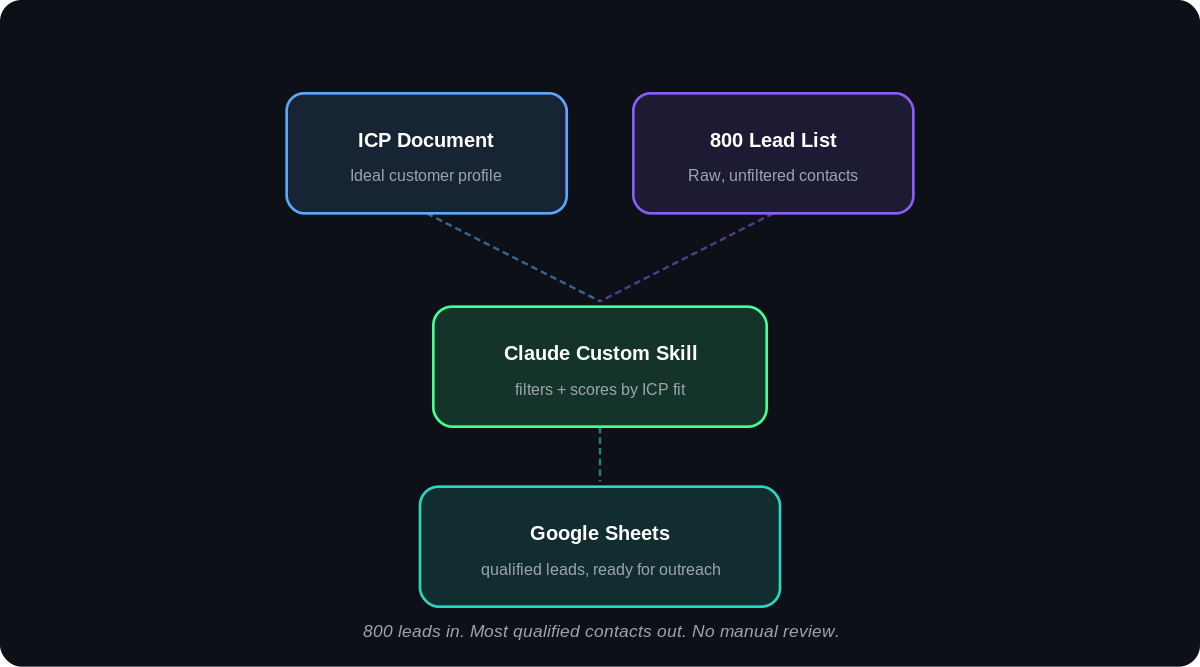
We did this with a client building an AI customer service product. They had a raw lead list and an ICP document no one had time to touch. We loaded both into a Claude project, asked it to enrich and qualify each lead based on their LinkedIn bio and website, score by fit, and return a ranked list. It would’ve taken 5-6 hours to do that manually, while a Claude prompt with memory did that in under 15 minutes. No API. No code. Just context loaded once, reusable many times.
Level 4: The Operator
Now we get really serious. Claude doesn’t just think. It acts.
You connect it to the tools your business already runs on: Notion, your fave CRM, email, Slack, Google/Outlook calendars, Figma, etc.
We had an 800 lead list last month.
We ran it through Claude entirely through a well-crafted skill and asked to filter out leads that weren’t qualified under an ICP Notion doc we provided.
For each lead Claude scraped their LinkedIn profile, compared their bio to the ICP and voilà → 15 minutes, filtered lead spreadsheet in Google Sheets with a personalized starting message, ready to use for outreach.
Now as you know, this newsletter is called No BS AI, so I’ll be straight with you. What I described works. It’s not perfect every time and it requires fine-tuning - but it handles the kind of work that’s been sitting on someone’s to-do list for months, in under 15 minutes.
While level 3 gives you a smart advisor, level 4 gives you someone who does the work.
What unlocks level 4 is automation via SKILLs + scripts + scheduling (optional).
You adjust to run this automation each Sunday at 7 AM:
Claude runs a
/briefingSKILL every morning before you open your laptop.Pulls sales pipeline updates, flags urgent tasks in your CRM, summarises overnight activity.
You sit down and it’s already done.
At this point Claude isn’t something you use. It’s something that runs.
Level 5: The Agent
Tools talking to tools. Outputs triggering other outputs.
Currently I’m working on this level myself.
At this level you’re not running one workflow. You’re running for example three at once.
Here’s a quick example.
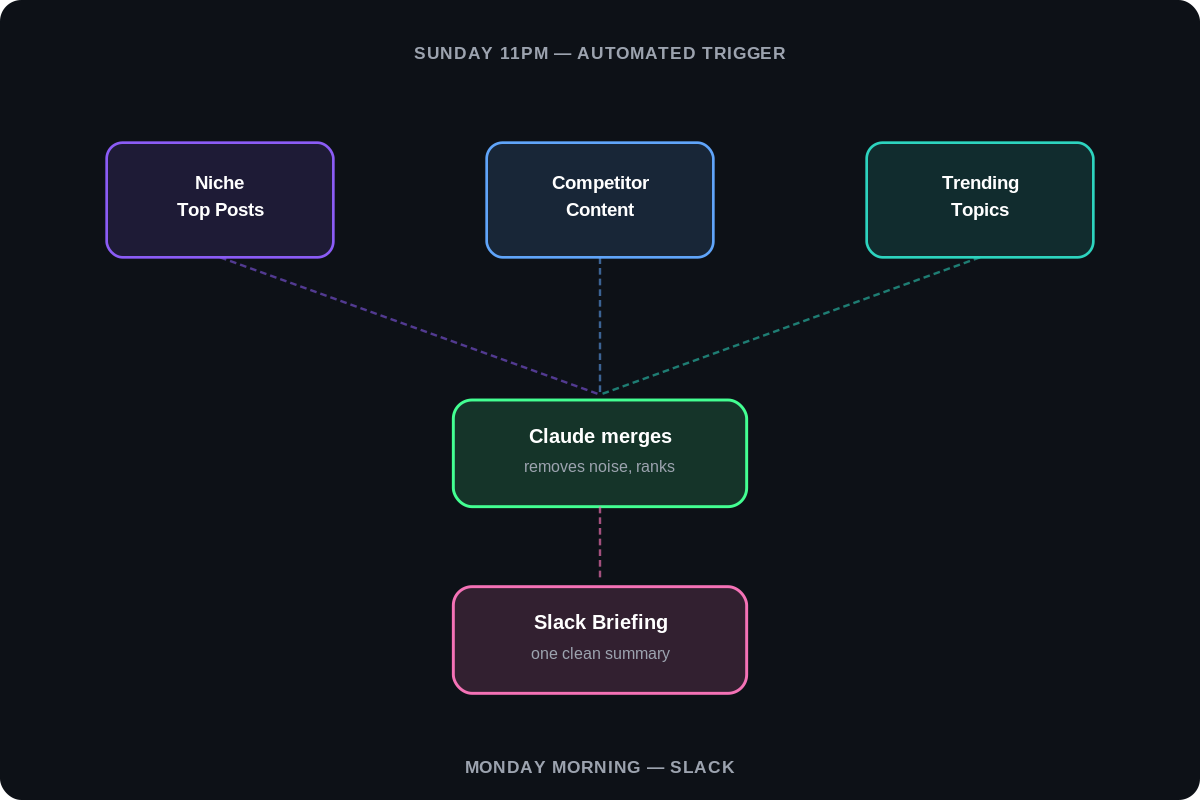
I needed a weekly content briefing for Substack. Decided to set up 3 parallel research streams: my last week’s top posts, competitor activity, and trending topics in their niche. All three run simultaneously. Claude merges the results when they finish and delivers one briefing in Notion. What used to be two hours of manual research, drafting and review, now runs in 20 minutes.
This is not a just chatbot. This is a clean infrastructure.
Level 5 runs on parallelism. Multiple agents, each with one job, all working at the same time.
The key is of course mapping the full workflow before starting the build.
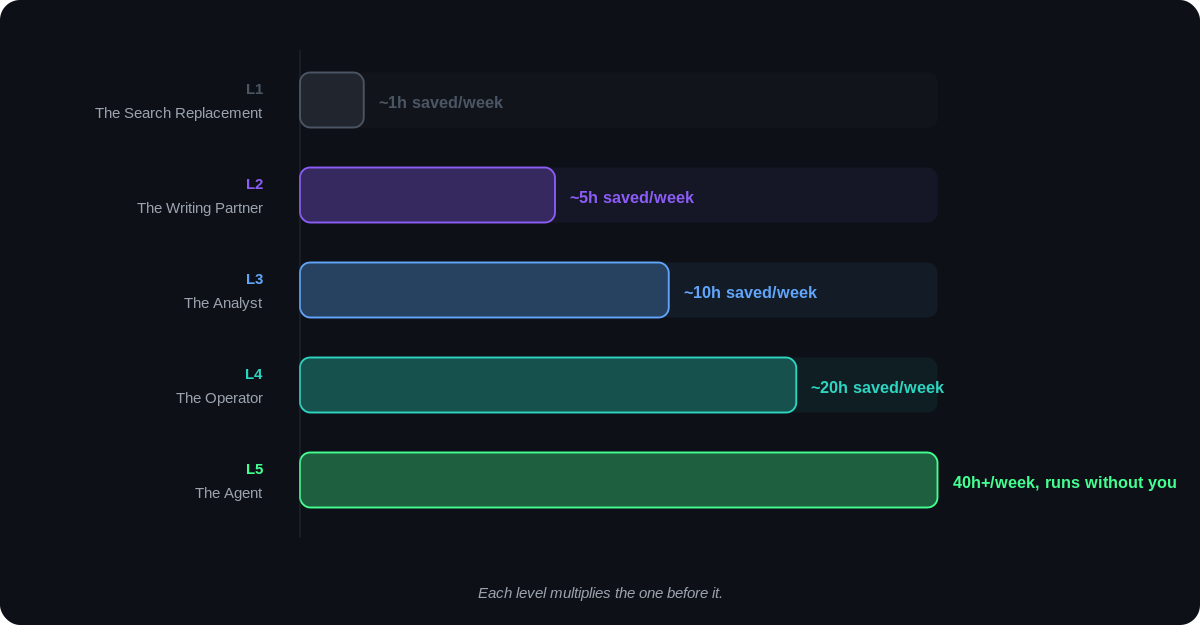
Time saved
This diagram shows you the rough amount of time saved for each level based on what I’ve seen at the agency.
The Real Gap
Look, I see so many people stuck at Levels 1 and 2, some of them reach Level 3 and very rarely I see people using Level 4 and above properly. Usually it’s not because they don’t understand AI.
They just never saw what’s possible and what’s not.
This newsletter is about cutting off the noise and delivering what actually matters to you.
AI gurus will tell you the key is better prompts, or writing more specifically, adding more context, more files to your knowledge base, more, more... Take a course and unlock some hidden layer of Claude’s potential. That advice has serious limitations.
Prompting lives at Level 1 and 2, where there is 0 leverage.
The real leverage kicks in when you stop prompting and start building reusable systems - context that loads itself, tasks that run without you. When Claude isn’t answering your questions but running your systems. When you don’t need to open the app at all.
Most people don’t know that version exists. They’re getting really good at Level 2, calling it AI fluency, while Levels 4 and 5 sit there completely untouched.
Here’s a summary of the 5 levels:
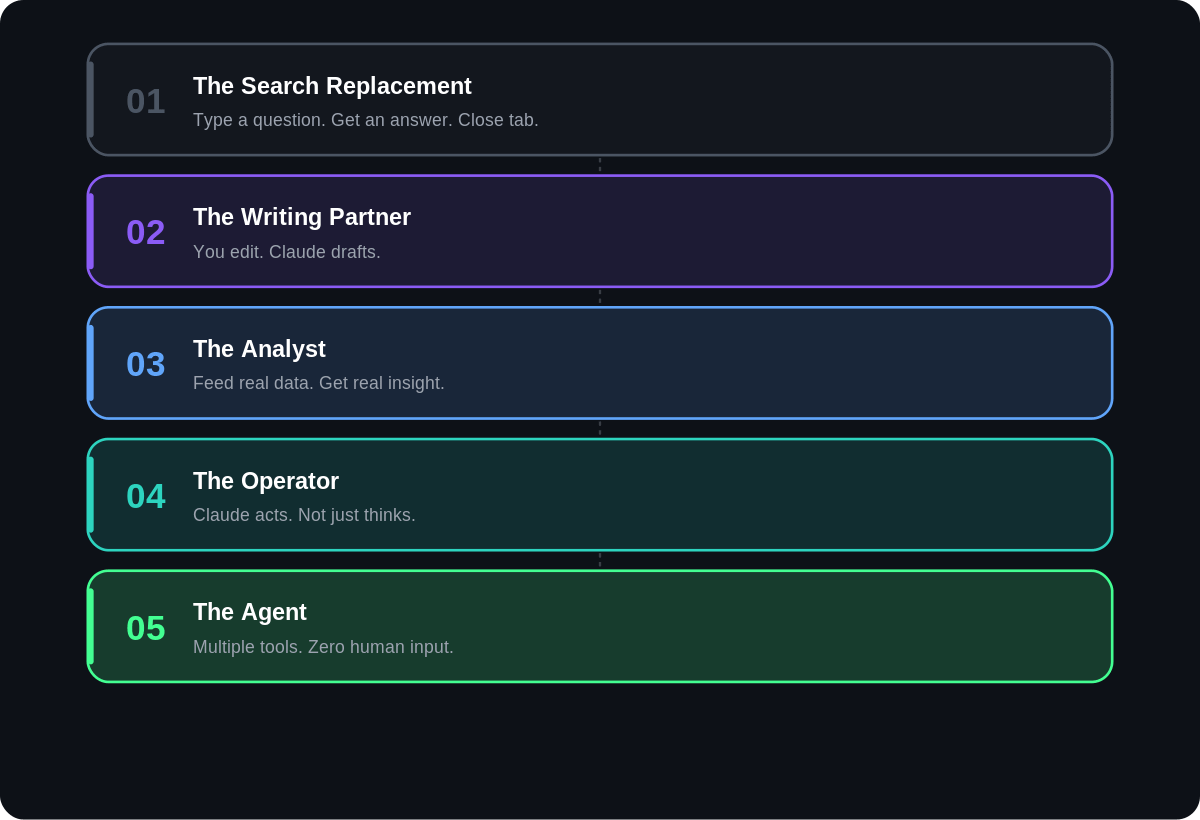
Most people won’t get past Level 3 this year. Not because it’s hard. Because they don’t know about Level 4 and 5.
Now you do. So start building.
Talk soon,
Ilya
PS: if you enjoyed this article, I’d really appreciate if you shared it with someone who might be interested.