



I was so tired of giving my AI agent corrections all the time. It’s either stylistic, or length, or content correction. It always says yes, and then the next session it does the exact same thing all over again.
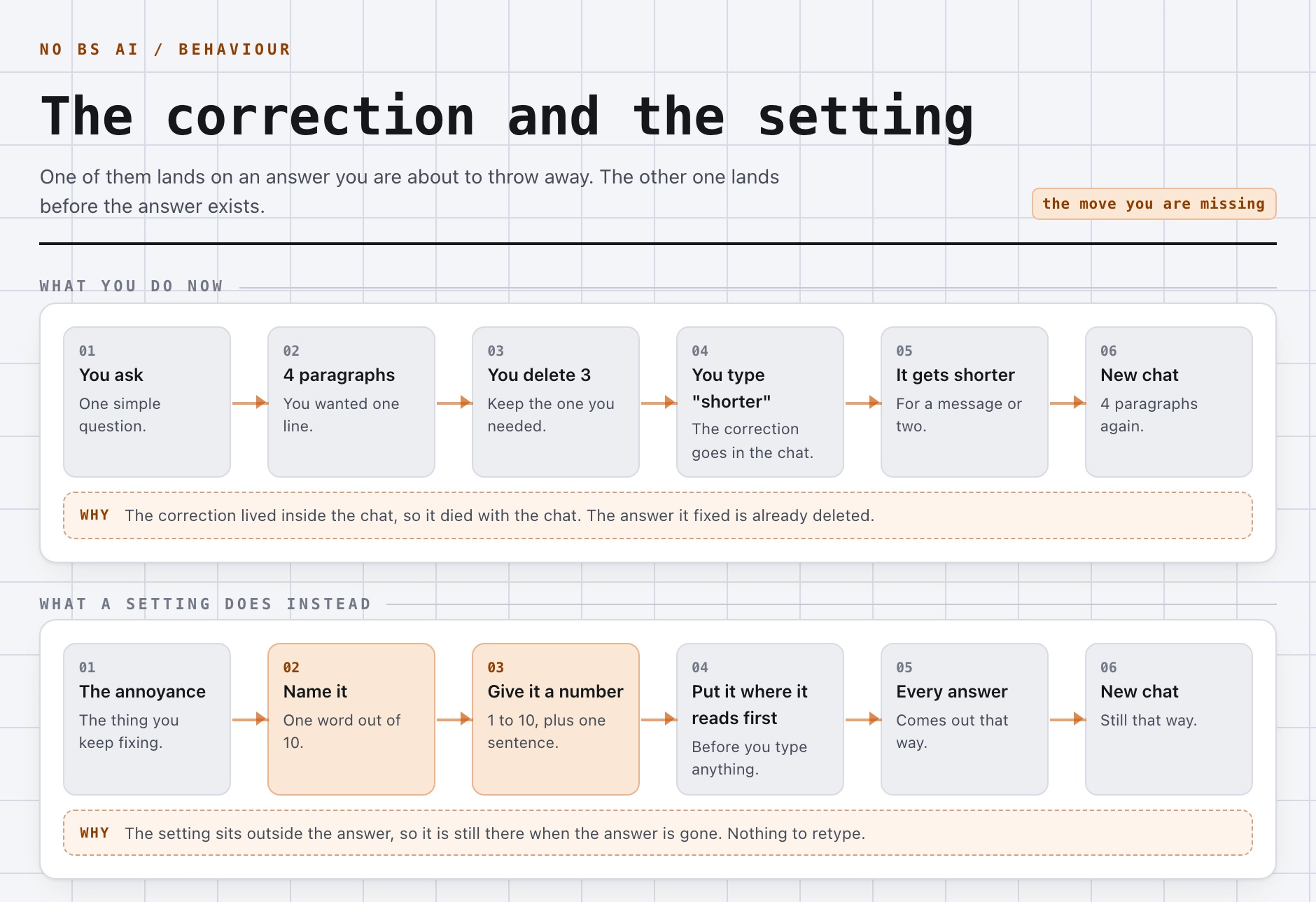
So I type it again. It works for a message or two, and then I open a new chat the next morning or the next hour or so, and I’m back to rewriting half of everything I asked.
It was so frustrating so I realized that there must be a way of creating the perfect settings adjustments for your agent.
So I thought about the game character analogy.
To make the long story short, I found that there are 10 small tweaks that can help you fix this, and none of them need you to install a single thing. So, please, follow along.
Subscribe to No BS AI
One real copy-pasteable build like this every week.
The problem
The main problem with the current AI agents is that they agree with things they should be arguing with. They write 4 paragraphs when you only wanted one. And they ask permission for something tiny, then that task goes completely off and the agent does something huge without asking at all.
The agreeing part has real research behind it by the way. A study called SycEval gave models a correct answer and then pushed back on it anyway. Across ChatGPT-4o, Claude Sonnet and Gemini 1.5 Pro, 58.19% of the samples moved.
Now most of that movement went toward the right answer, 43.52% of it, while only 14.66% moved toward a wrong one. So they are not simply caving, they are mostly getting corrected.
But once a model flipped, it then stayed flipped 78.5% of the time, which means asking it again in the same chat is not really giving you an alternative opinion. You are asking something that already agreed with you once.
Why writing more instructions does not fix it
There are 2 reasons for why writing more doesn’t get this problem fixed, and both of them boring unfortunately.
The first one is that an instruction in the chat lasts about as long as the chat does. You tell it to be blunt, it is blunt for one message, and then it goes back to normal while the thing you are actually fighting shows up in every message after that.
So you move the instruction into a file. Which is better of course, and most people sit right there, but I’m gonna tell you that files grow. You add a rule after a bad session, you never delete it, then you add another one, and 6 months later you have 400 lines that nobody reads anymore, including the model.
That last part is measured by the way. Anthropic’s own engineering team wrote that models have something called an “attention budget”, and that as the number of tokens in the context window goes up, the model’s ability to recall anything out of it goes down. Their advice is to find “the smallest possible set of high-signal tokens”.
10 numbers is a small set of high-signal tokens. A 400-line rules file is not.
What a character sheet actually is
I decided to still use a file to treat this problem, but without letting it grow indefinitely, and I got the idea of treating the agent as a game character with its own stats. It’s somewhat of a dimmer switch that you gradually adjust to the value you need.
And actually, most AI instructions are light switches. “Always push back on bad plans” is on. “Be concise” is on. There is no in between anywhere, so the model picks its own in between, and it picks a different one every session.
A character sheet turns each of those into a dimmer instead. Each word represented on a scale of intensity from 1 to 10, and one sentence telling the model what a higher number means.
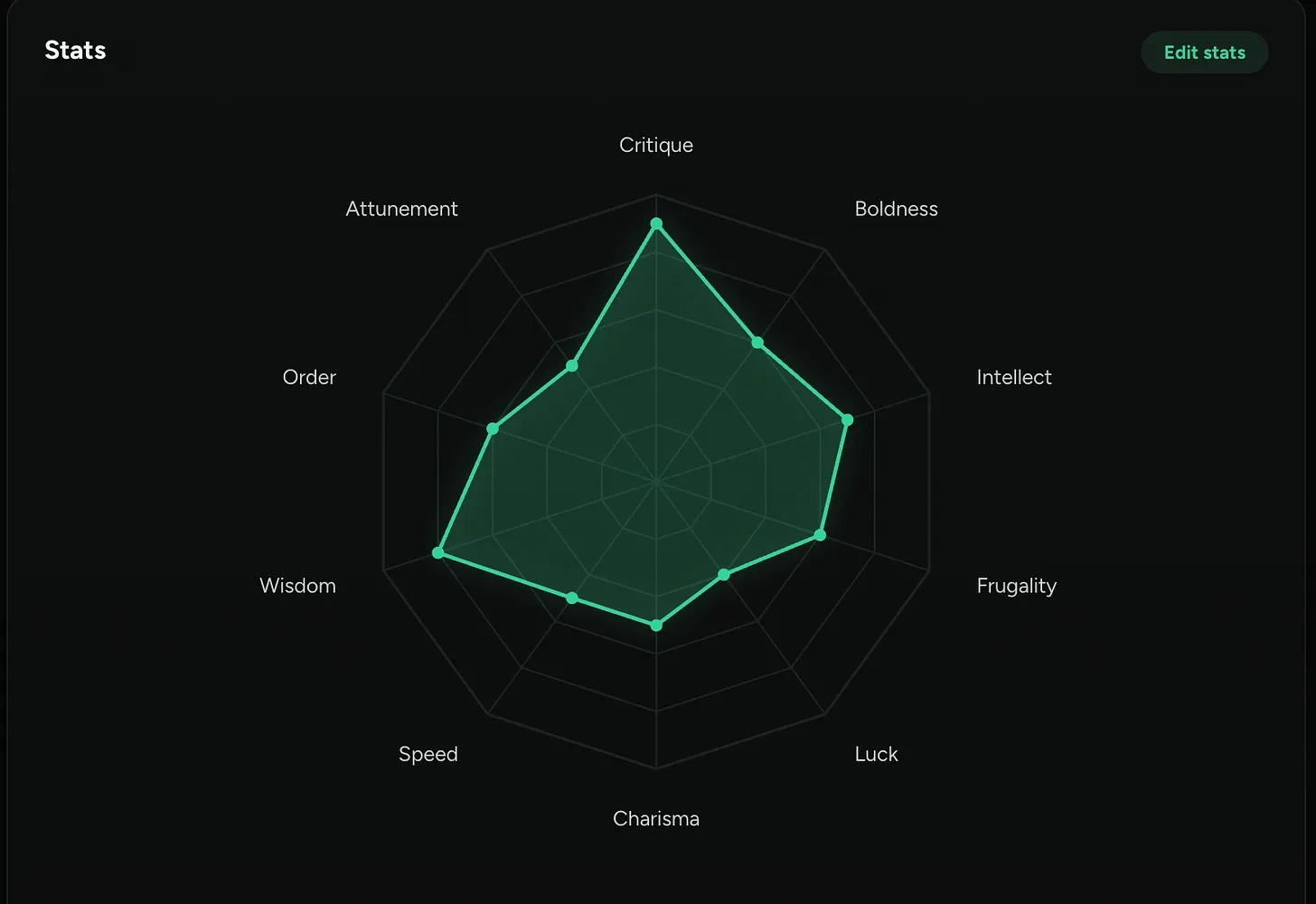
Here is what mine looks like once all 10 of them are set. The shape is the whole point: you can see at a glance which way each dial is turned, without reading a single line of instructions.
As you can see I bumped my Critique up in order to let Claude agree with me less.
One number does the job of 5 huge paragraphs.
What you need
For building something like this you’d need 3 ingredients, and you probably have 2 of them already:
Somewhere to store the numbers. A file, a note, the project instructions box. Anything your assistant actually reads. This can be a json file for example, see below.
An AI assistant that reads standing instructions. Claude with a project, the custom instructions box, whatever you already use.
About 1 hour, and most of that is just you deciding what your numbers should be.
No terminal, no code, nothing to install.
Step 1: write the numbers down
Here is the shape of it. This is just a template you can use in your own project, you get 3 of the 10 stats, so you can see how one row works before you go and write your own.
{
  "attributes": {
    "critique": {
      "value": 8,
      "effect": "Challenge a weak plan before building it. Name the problem, propose the better move, then wait."
    },
    "charisma": {
      "value": "<your number, 1 to 10>",
      "effect": "<what a HIGH number means. Example: answer at length, with examples>"
    },
    "wisdom": {
      "value": "<your number, 1 to 10>",
      "effect": "<what a HIGH number means. Example: look inside a file before overwriting it>"
    }
  }
}
Critique is filled in as a demonstration so the shape is obvious, and the other 2 are yours to write. The complete 10-stat sheet, with the numbers I actually run, is in the paid edition.
Now effect is the important one. That is the only sentence the model really reads, so you want to write it as an order and not as a description. “Look inside a file before overwriting it” tells it what to do. “This stat represents carefulness” or, the one that makes me laugh every time, “be more human” tell it nothing at all.
Step 1 done. You have the numbers locked in, but they mean nothing and nothing reads them yet.
Step 2: tell it what the numbers mean
A number on its own without a specific meaning is just a decoration. critique: 8 means nothing to a model that was never told what critique is.
So the Stats go next to the numbers. Paste this in and edit the list to match whatever settings you picked:
## Stats

You have a character sheet of stats, 1 to 10 each. They are live behaviour
levers, not decoration. Read them and apply every one of them. Higher =
more of the effect.

- Critique. Your pushback bar. Below it, say what is wrong before you
  build anything. At or above it, just build. If I say go anyway, do it
  my way and drop it.
- Charisma. Output length. Low = the result only. High = the full
  explanation with examples.
- Wisdom. Data-loss guarding. High = look at what you are about to touch,
  and copy it first.
And the last line of the Critique block does more work than the rest of it. If you leave out this phrase “if I say go anyway, do it my way and drop it”, you then get an assistant that argues, and then argues about the argument, and you will eventually stop reading its objections.
Step 2 done.
Step 3: put it somewhere it gets read
Now, open a project in Claude, or your custom instructions box, and paste both blocks straight in. The numbers and the manual, together, in the same place.
Then it gets read at the top of every chat inside that project, without you doing anything at all.
One catch worth knowing. Doing it this way means that when you change a number, you edit it in the box yourself. The automatic version reloads it for you at the start of every session, and that is the wiring in the paid edition.
Step 3 done.
In practice
Now, if you want this in your system copy-paste the prompt below into Claude → Set Auto Mode → Launch Prompt → Done.
## Context
Your creating a character sheet for adjusting how you write your responses through sessions.

## Instructions
Your job is to:

- Read and analyze the below article
- Understand what needs to be implemented
- Implement everything that has been said in the appropriate Claude Code folder

## Pasted article
[Paste this article here]
Then, start with one number. Whatever annoys you most this week, for example the “language difficulty level” or the “output prompt length”, find the word for it, give it a number, and paste it in.
Then leave it alone for a couple of days. Do not tune anything until something irritates you twice.
And when something does, move that one number by 1 or 2 for the start and see how it changes.
The paid edition this week has my own sheet in it: all 10 numbers with the values I actually run, the script that loads them automatically at the start of every session, and the 4 ways this whole thing breaks quietly on you.
Subscribe to No BS AI
One real copy-pasteable build like this every week.
Talk soon,
Ilya