



Look, I had this pretty big problem of Claude giving me bs output all the time. It was returning me EM dashes, weird formatting, proposing stylistic structures I have never used. It was so frustrating to tell to edit it in every session.
Then I decided to dive deeper and I realized that just blindly prompting and adding rules upon rules in a file that Claude never reads is a dead end.
So I solved it in a way I haven’t seen anyone doing it before.
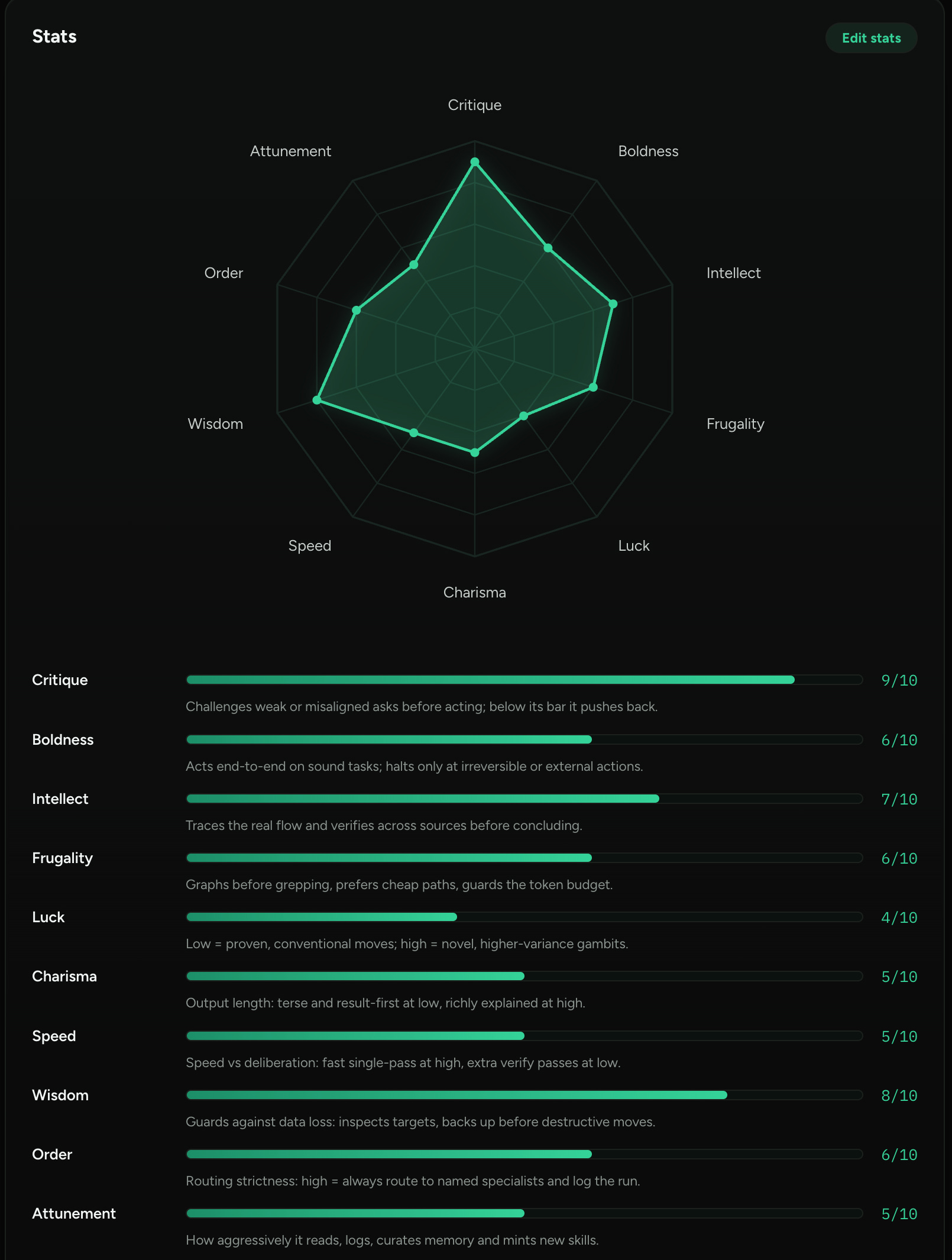
What the situation look like right now is this: my AI assistant has 10 numbers attached to it, and when it starts misbehaving those numbers are the only thing I actually edit to put it back on track.
For example I have:
Critique set to 9
Boldness set to 6
Wisdom to 8
Speed to 5
I’ll explain what those numbers mean in just a second, bear with me.
So those are just raw values, sitting in a file under a claude folder right now. As you probably noticed, I set this thing up like a video game character. I genuinely believe it’s the simplest analogy there is for making Claude behave the way I actually want.
So Claude reads those stats at the start of every single session.
So when it hands me a solution which is too good to be true, or just starts agreeing with everything I say, I do not write another paragraph of instructions and sit there hoping.
I open that file, or better my character dashboard, move the critique stat up by 1, and start a new session.
And that is really the whole thing. 10 numbers instead of a growing wall of rules that nobody reads.
Look at how it looks on my end:
The problem
You give it a correction, it says yes, and then the next session it just does the exact same thing all over again.
And if you ask anyone who uses AI every day you get pretty much the same short list. It agrees with things it should be arguing with, then it writes you 4 paragraphs when you only wanted one, and it asks permission for something tiny, then goes and does something huge without asking at all, which has happened to me more than once honestly.
By the way, the agreeing part has real research behind it. A study called SycEval gave models a correct answer, then pushed back on it anyway. Across ChatGPT-4o, Claude Sonnet and Gemini 1.5 Pro, 58.19% of the samples moved. Claude Sonnet on its own, 57.44%.
Now most of that shift went toward the right answer actually, 43.52% of it, while only 14.66% moved toward a wrong one. So the models are not simply caving, they are mostly getting corrected.
But once a model flipped, it then stayed flipped 78.5% of the time.
When you’re asking something that already agreed with you once, it will probably just agree again.
I noticed that the judgement has to come from outside the conversation.
Why writing more instructions does not fix it
And there are 2 reasons, both of them boring unfortunately.
So the first one is that an instruction in the chat lasts about as long as the chat does. You tell it to be blunt, it is blunt for one message, and then it goes back to normal, while the thing you are actually fighting shows up in every single message after that.
Then you move the instruction into a file. Which is better of course, and most people stop right there, but files grow. You add a rule after a bad session, you never delete it, then you add another one, and 6 months later you have a huge 400 lines file that you’ll never read. I’m talking from personal experience here.
That last part is measured because Anthropic’s own engineering team wrote that models have an “attention budget”, and that “as the number of tokens in the context window increases, the model’s ability to accurately recall information from that context decreases”. Their advice is to find “the smallest possible set of high-signal tokens”.
10 numbers is a small set of high-signal tokens. A 400-line rules file is just noise.
What a character sheet actually is
A character sheet, I’d say, is just a bunch of statistics your AI agent has, basically a dimmer switch that you adjust.
Most AI instructions are similar to light switches though. “Always push back on bad plans” is on. “Be concise” is on. There is no in between, no gradation, so the model picks its own in between, and it picks a different one every session.
A character sheet turns each of those into a dimmer. Just one simple word, just one simple number from 1 to 10, one sentence saying what a higher number means.
Critique 9, for example, means push back very hard before providing any substantial changes.
Boldness 6 means act on your own, but stop at anything you cannot undo.
Charisma 5 means answer at normal length, not an essay.
So 10 of these, all sitting in one small file. Your assistant reads them at the start of every session, and when something annoys you, you go and move one number.
One number does the job of 5 big paragraphs.
What you get from this article
So that was the doctor’s diagnosis. Your AI agents has no settings at all, so it just invents its own every session.
Below the line you get the full build:
The actual file with my 10 numbers in it, complete, copy and paste.
The block you put in your instructions so the numbers mean something instead of sitting there just as a fancy decoration.
The small script that loads them at the start of every session, and the one line of settings that runs it.
Then my tuning log. Which number I actually moved since I built this, what made me move it, and what I found when I read the file’s history. It was not what I expected at all, and it will probably save you a bunch of tuning time.
This is what my own assistant reads before every session. One small file, a 20 line script, one line of settings. I have not touched 9 of the 10 numbers since I wrote it.
Ok. Enough talk. Let’s build it.
I know a script and a settings file might sound technical. Honestly they are not. One file you copy, one line you paste. And if you never open a terminal at all, there is a version of this for you in step 3.
Quick heads up: I will be publishing a free overview of this build in 2 days, so stay tuned. If you want the complete build, it’s only accessible under the line, then follow along.
