



Today getting a bunch of B2B leads from a resource is really only a fraction of the “how to sign a client” problem.
The other half is qualifying, then contacting, then getting them to reply, then moving them to the call, and finally closing the deal.
But let’s assume you already got a list of leads…
I opened the CSV from Get 500 Leads for $0 in 25 minutes and read down the rows. Sales Navigator had done exactly what I asked, which is to find people who fit the filters I typed in, and a lot of them were still wrong for me. That left me with 500 people and no idea who to message first.
Which of those rows should get a message first?
No idea.
Back when I was starting out I took lists like that and blasted all of it with cold emails and DMs, and nobody really cared about my offer. So this time I wanted to know who was worth a message before I sent a single one.
Then I decided to put every row through the same 3 checks before writing a message, and to sort the results into 4 piles, one of them being the 10 people I actually message. To make the long story short, it’s 3 checks, 4 piles and a top 10, and one prompt in Claude runs all of it. Ok. Enough about my list, let’s sort yours.
Subscribe to No BS AI. One real copy-pasteable build like this every week.
Step 1: get your CSV and your ICP ready (2 minutes)
You need 2 things: the CSV from that article, with a name, a title, a company, a location and a LinkedIn link on each row, and your ICP (the description of the person you sell to).
Your ICP fills the top of the prompt in step 2: who you sell to, buyer titles, non-buyer titles, company size, geography, green keywords, red keywords, hard disqualifiers and your offer in one line. If you haven’t written your ICP yet, How to Sell an Offer to the Right People in 67 Minutes has a prompt for it.
Open both before you move on.
Step 2: score every lead (2 minutes)
The prompt gives each lead a color on 3 signals: green, yellow or red. This way you stop judging a row by how good the title looks at first glance:
Title: a buyer role is green, a relevant company with a non-buyer role is yellow, an irrelevant title is red.
Company: a company that clearly matches your ICP is green, a name that tells you nothing is yellow, a clear mismatch is red.
Geography: inside your target is green, outside it but still allowed is yellow, excluded is red.
Then it puts every lead in one of 4 tiers, and each tier tells you what to do with the row:
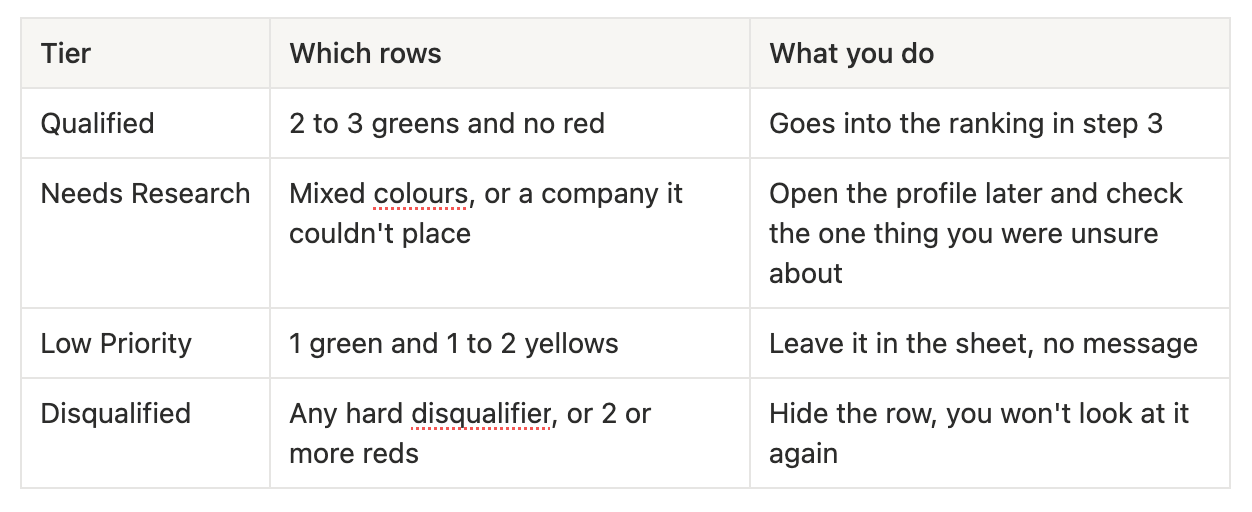
If it’s unsure about a company, the row goes to Needs Research, because a wrong Qualified costs you a message and a wrong Needs Research costs you a click.
Paste the prompt below into Claude, fill the curly brackets from your ICP, paste your CSV rows where it says THE LIST and send it:
You are qualifying a lead list against my ICP. Be fast and blunt.

MY ICP
- Who I sell to: {company type, e.g. coaches, agencies, freight brokers}
- Buyer titles (green): {titles}
- Non-buyer titles (skip): {titles}
- Company size: {employee range}
- Geography: {countries or regions}
- Green keywords (title, company, bio): {keywords}
- Red keywords (disqualify): {keywords}
- Hard disqualifiers: {e.g. enterprise brands, agencies, under 5 employees}

MY OFFER (one line): {what I sell and the pain it fixes}

THE LIST
{paste the CSV rows: name, title, company, location, LinkedIn URL}

STEP 1. Clean it. Remove rows without a real person's name, and duplicates. Tell me how many you removed.

STEP 2. Score each lead on 3 signals, GREEN / YELLOW / RED:
1. Title: buyer role = green, relevant company but non-buyer role = yellow, irrelevant = red.
2. Company: clearly matches my ICP = green, name gives no signal = yellow, clear mismatch = red.
3. Geography: in target = green, outside but allowed = yellow, excluded = red.

STEP 3. Assign one tier:
- Qualified: 2 to 3 greens, no red.
- Needs Research: mixed or ambiguous company.
- Low Priority: 1 green, 1 to 2 yellow.
- Disqualified: any hard disqualifier, or 2+ reds.
If you are unsure about a company, mark it Needs Research. Do not guess.

STEP 4. Output:
A) Summary: total reviewed, and the count per tier.
B) My TOP 10: rank the Qualified leads by (1) decision-maker title, (2) company size closest to my sweet spot, (3) strongest fit with my offer. For each, one line:
   [#] First Last | Company | Title | LinkedIn URL | Why: one sentence
C) Needs Research list: name, company, and exactly what to check on LinkedIn.
Do not list Disqualified leads individually. No apologies, no extra commentary.
If you’d rather skip Claude, the same 3 signals and 4 tiers work in a spreadsheet: a G, a Y or an R in every cell, then the tier in the last column.
Here’s an overview of my results for a list of freight brokers.
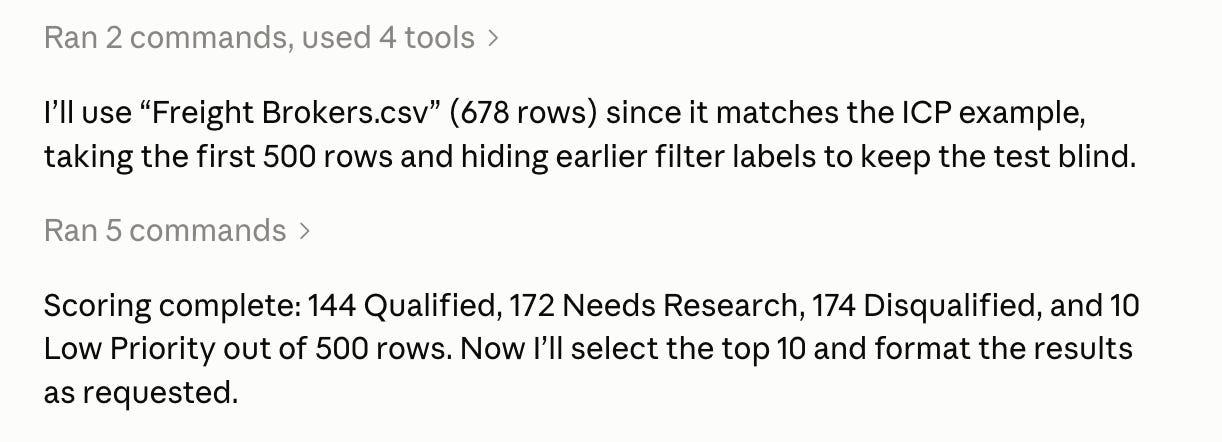

Super simple, right? And it all happened in a matter of 5 minutes for a list of 500 people.
Step 3: pick your top 10 (1 minute)
Claude gives you back 3 things: a summary with the count per tier, your top 10 with one sentence on why each person is there, and a Needs Research list with exactly what to check on LinkedIn for each.
Decide your tie-breakers before you look at any names, otherwise the ranking turns into whoever you like the sound of. The prompt ranks by decision-maker title first, then company size closest to your sweet spot, then fit with your offer, and you might want to change that order in part B to fit your own.
Keep the 10 names. Needs Research stays as your next list.
In practice
About 1 hour by hand on 100 rows, most of it spent giving rows a colour.
Cut your ICP into 3 short lists and delete the junk rows.
Give every row a Green, a Yellow or a Red on title, company and geography.
Type the tier into the last column and sort by it.
Rank the Qualified rows with your own tie-breakers, keep 10 and write why next to each.
Subscribe to No BS AI. One real copy-pasteable build like this every week.
Talk soon, Ilya