



Let’s say you had a good scoping call this morning, and somebody is now waiting on a proposal from you.
What happened to me most of the time was that I had to sit 2-3 hours each time, check my competitor’s prices, check what has been said on the call, lay down the objectives, the phases and the expected timelines of the project. Of course it took me an eternity and by the time I finished, I was already tired.
So I thought that a task like this can be easily automated using Claude or any other AI agent, but not in the way you think.
Let me explain.
Subscribe to No BS AI
One real build like this every week, in simple words.
What you get when you paste the whole transcript in
Now most people try the obvious version first, and it’s completely normal to try that one first.
You paste your hour of transcript in, you ask for a proposal, maybe you even have a template, but you still end up sitting and chatting with Claude for 3 hours.
I did this myself and I realized that this setup has 3 main problems:
It makes up data for you. No number got said out loud on that call, so the model reaches for one that fits the size of the job, and your document is now quoting a rate you never agreed with anybody. Basically the model is just making up numbers and other data for you.
It is inconsistent. Say your Notion property is called “Client” and the agent decided it was “Client Name” because you forgot to specify it.
It is very slow. You still have to sit and chat with the agent and ask it to tweak several things. Eventually, you still end up spending 2-3 hours of your precious time, while you could use it on other high leverage tasks.
So you do technically have a proposal. In practice you have a draft to check line by line against a recording, which is exactly the slow type of afternoon we are all trying to skip.
What you actually need
Ok. Enough about what goes wrong.
So three things, and 2 of them are probably on your machine already. There is no code in any of this and no terminal either. You’ll need:
A call recording tool that keeps the whole transcript. The tidy summary it writes afterwards will not work here. Summaries drop the numbers and they drop the objections, and those 2 things are what a proposal gets built out of. We need the transcript itself.
Notion + 3 databases inside it. One for meetings, one for projects, one for clients. And if you run anything CRM shaped in there already, you have all 3 under maybe different names, which is fine.
An agent that takes skills and connectors. A skill is a folder holding one file that spells out how you do a job. A connector is that little switch that lets your agent see inside an app you already use.
Switch on 2 connections and leave it there. One to read your calls, one to write your pages. Each extra connection eats attention, and 2 apps you open daily are worth more here than 15 you enabled once and forgot about. So keep your connectors lean.
Here’s how to enable them:
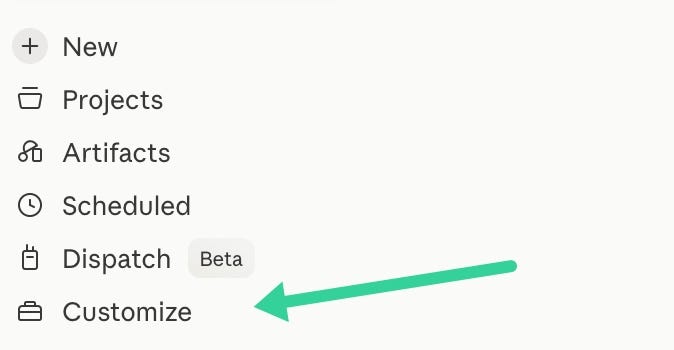
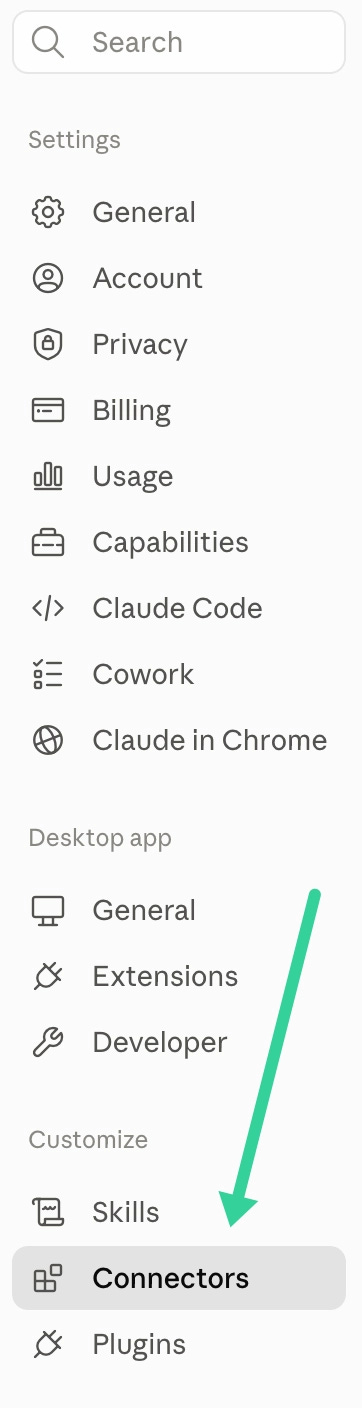

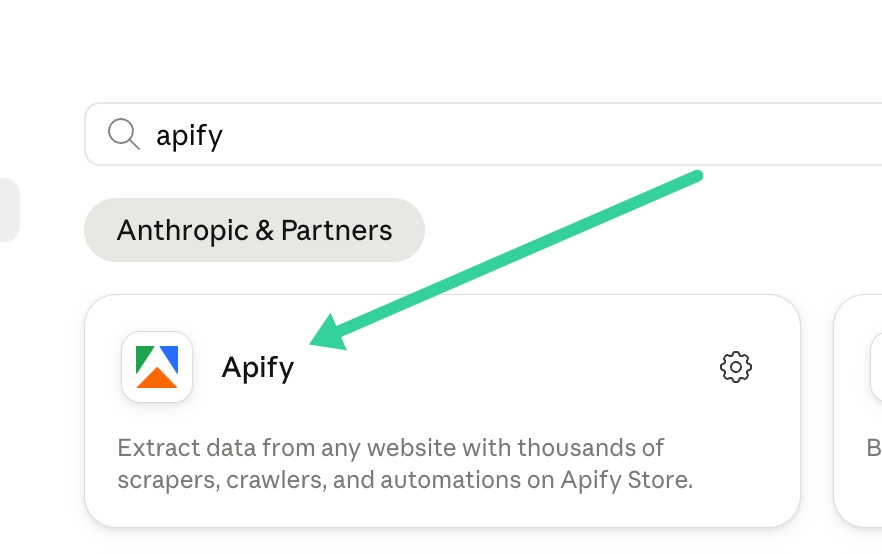
Those screens happen to show Apify by the way. Connecting your recorder or your Notion looks the same.
Step 1 done.
Step 2: let it pull the call and give it a shape
Now here is the part that does the actual work, and there is a lot less of it than you would think honestly.
You do not paste anything anywhere. Your recorder is connected already, so the agent goes and pulls the call by itself through the connector. What you hand it instead is a shape, and that shape is what turns “write me a proposal” into a document that comes out the same way every time you invoke the skill.
So here is the whole thing as one message. The 3 shapes are in it with their real headings, one line under each saying what belongs there, and the rules at the bottom. Put your client’s name at the top and send it.
Pull the full transcript of my call with <client name>. The full transcript
and not the summary, because summaries drop the numbers and the objections,
and those 2 things are what a proposal gets built out of.

Then write me 3 documents from it, using exactly these headings.

1) MEETING NOTE, internal

## Summary
<2 to 4 sentences. Start with where the call landed, not with the setup.>
## Key Points
<3 to 6 bullets. Decisions, constraints, numbers, commitments. One idea each.>
## What Happened
<The call in order, kept tight. Only what came out of the recording.>
## Next Steps
<- [owner] to [action] by [date or TBC]. An owner on every single line.>
## Objectives and Goals
<What they are trying to achieve, in their words. Nothing you invented.>

2) OVERVIEW, internal, and no pricing anywhere on this one

## Project Snapshot
<Client, what they do in one line, where the engagement stands today.>
## Problem
<What is broken or missing right now, and what it costs them.>
## Scope
<What you are delivering, as bullets. Mark anything out of scope out loud.>
## Approach
<How you deliver it, and what you need from them to be able to.>
## Risks and Unknowns
<Open questions and things that could slip. Mark each one as yours or theirs.>
## Timeline
<Phases with rough dates. Write TBC wherever the call did not set one.>
## Internal Notes
<The honest read. Gut feel, watch-outs, who the real buyer in the room is.>

3) PROPOSAL, this one goes to the client

## Overview
<2 to 3 sentences, to them. What you understand they need, what you propose.>
## Objectives
<3 to 5 bullets. The outcomes, in their terms and not in yours.>
## Scope of Work
<Deliverables, in phases where that helps. State what is not included.>
## Approach and Timeline
<Phases, milestones, dates. What you need from them to hold those dates.>
## Pricing
<The price, per phase or per retainer, with terms and frequency. If a number
is not fixed yet, write TBC. Never write a guess.>
## Next Steps
<What happens once they approve, and how they say yes.>

Rules for all 3:
- Use only what was said on the call. Do not add a deliverable nobody asked for.
- Never invent a price, a date, a headcount or a volume. Write TBC instead.
- Restate the problem in the client's own words, not in mine.
- Say "we" in the proposal, never "I". Pick one and hold it all the way down.
- Plain sentences. No hype words, no "seamless", no "cutting edge".
- Show me all 3 here in the chat. Do not write anything into Notion yet.
- At the very bottom, under "Missing", list everything you marked TBC and
  every question you would have asked me.
Now, look at the second to last rule in there. “Show me all 3 here…”, write nothing into Notion yet, because you want to read these before they exist as real pages anywhere.
And the “Missing” list at the bottom is also super important. That is your to-do list before any of this goes near a client, and if it ever comes back empty on a first run then something got quietly filled in for you, so check the proposal you’re sending.
The Proposal document your client reads and the Overview document your team reads are never the same document.
Step 2 done. That one message is most of the quality.
Step 3: put it into Notion
So now all 3 are sitting in the chat and you have read them. The price is right or it says TBC, the phase nobody asked for is gone, and the Risks section says something slightly uncomfortable rather than something polite.
Then they go into Notion, and this is where the second problem from the top of this article comes back at you. Your agent has never once looked inside your workspace. It does not know your property names, it cannot tell a real dropdown value from an invented one, and when you never tell it any of that, it guesses.
Guesses fail quietly here. A property name that does not exist does not throw an error, so the write just goes nowhere and the run still reports back that it worked.
And you do not have to go and dig any of that up yourself by the way. Your Notion is connected already, so it can go and read the database on its own. You give it the name, it finds the property names and every dropdown value, and then it uses what it read instead of what it guessed.
So the whole of step 3 is one more message, and it is this one:
Go and read my
<name of your database>first, and list the exact property names and the options each one accepts. Then create these 3 pages using those names, character for character. When you are done give me the links back. Not “created successfully”, the actual URLs.
Now that last bit is not politeness. An agent will tell you it created a page whether or not the page is really there, so a write is not done until you have the thing back in your hand and you have clicked it.
And that is the whole fix for the silent failure. Not an hour of setup, not even a list you write out yourself, just one line telling it to go and look before it writes.
Step 3 done.
The whole thing, end to end
The call ends and you go and make yourself a coffee.
Then you send the first message. It goes and pulls the transcript, sorts the whole call into the 3 shapes, marks every gap it found as TBC, and hands all 3 documents back to you right there in the chat.
You read the Missing list before anything else and fill in what it flagged. The real price goes where it says TBC. The phase nobody asked for comes back out.
Then you send the second message, and all 3 are pages in your Notion under the right project, with the links back so you can go and click them.
One call in, 3 documents out.
Every time.
In practice
Here’s what I’d do for implementing this e2e: open Claude Code → Paste the prompt below and the whole article → Set on Auto Mode → Done
## Context
You’re given an article for crafting proposal from client calls.
Use Fathom, Granola, etc as my call recorder and Notion as my primary project management tool.

## Instructions
Your job is to:

- Read and analyze the pasted article
- Apply all the instructions properly and put the files in the right folders/pages

## Pasted Article
[Paste article here]
Reach out to me on LinkedIn or Substack if any problems arise.
The paid edition has this same chain wired down to one sentence, so the call gets logged and all 3 pages get written without you typing any of it.
Subscribe to No BS AI
Every week, one thing you can actually use, explained simply.
Talk soon,
Ilya